Setting up Screen Time on iPhone 13
Screen Time is a powerful feature on the iPhone 13 that empowers users to manage and control their device usage. Whether you want to monitor your own screen time or set restrictions for your children, setting up Screen Time is a straightforward process that offers a range of benefits.
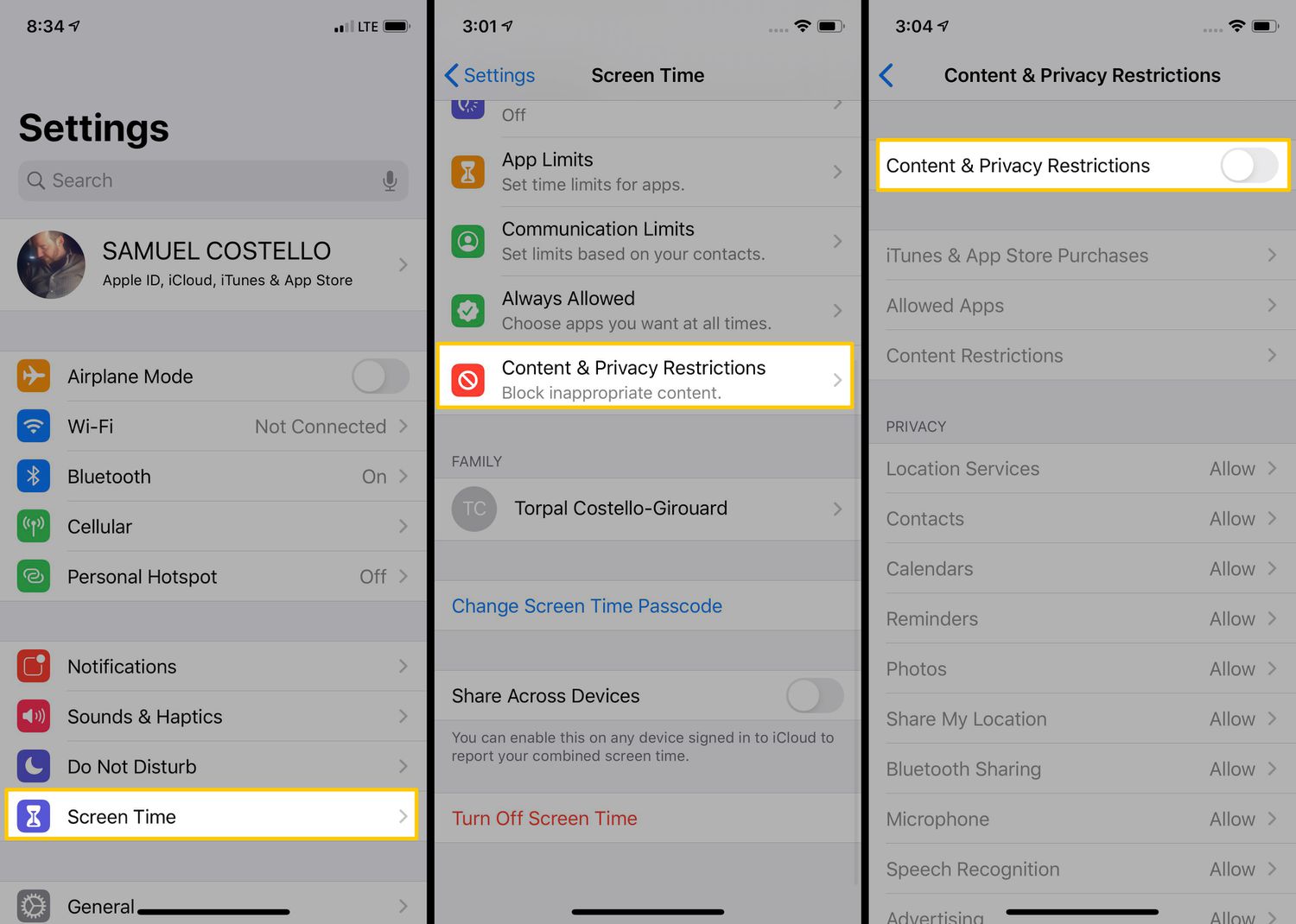
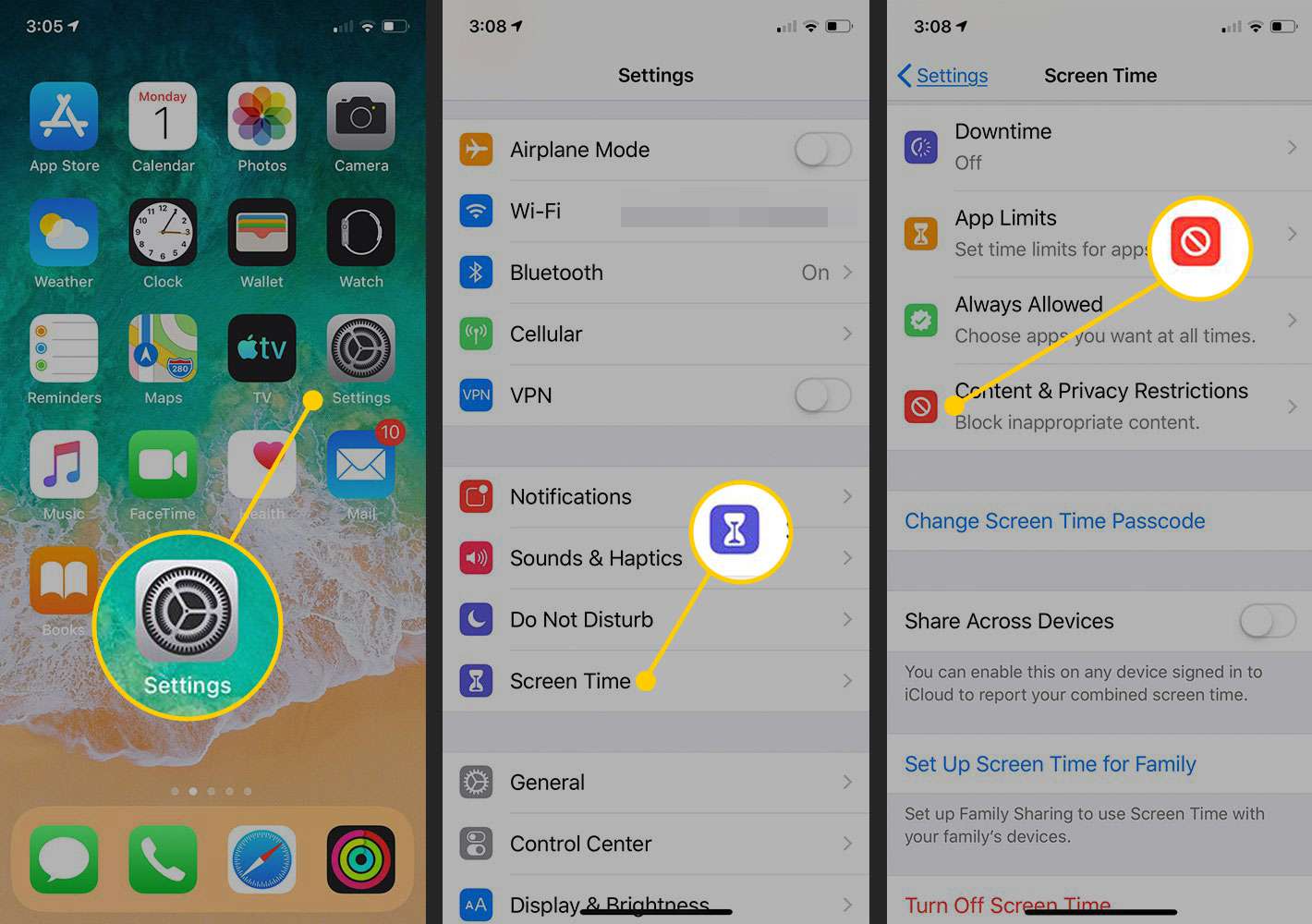
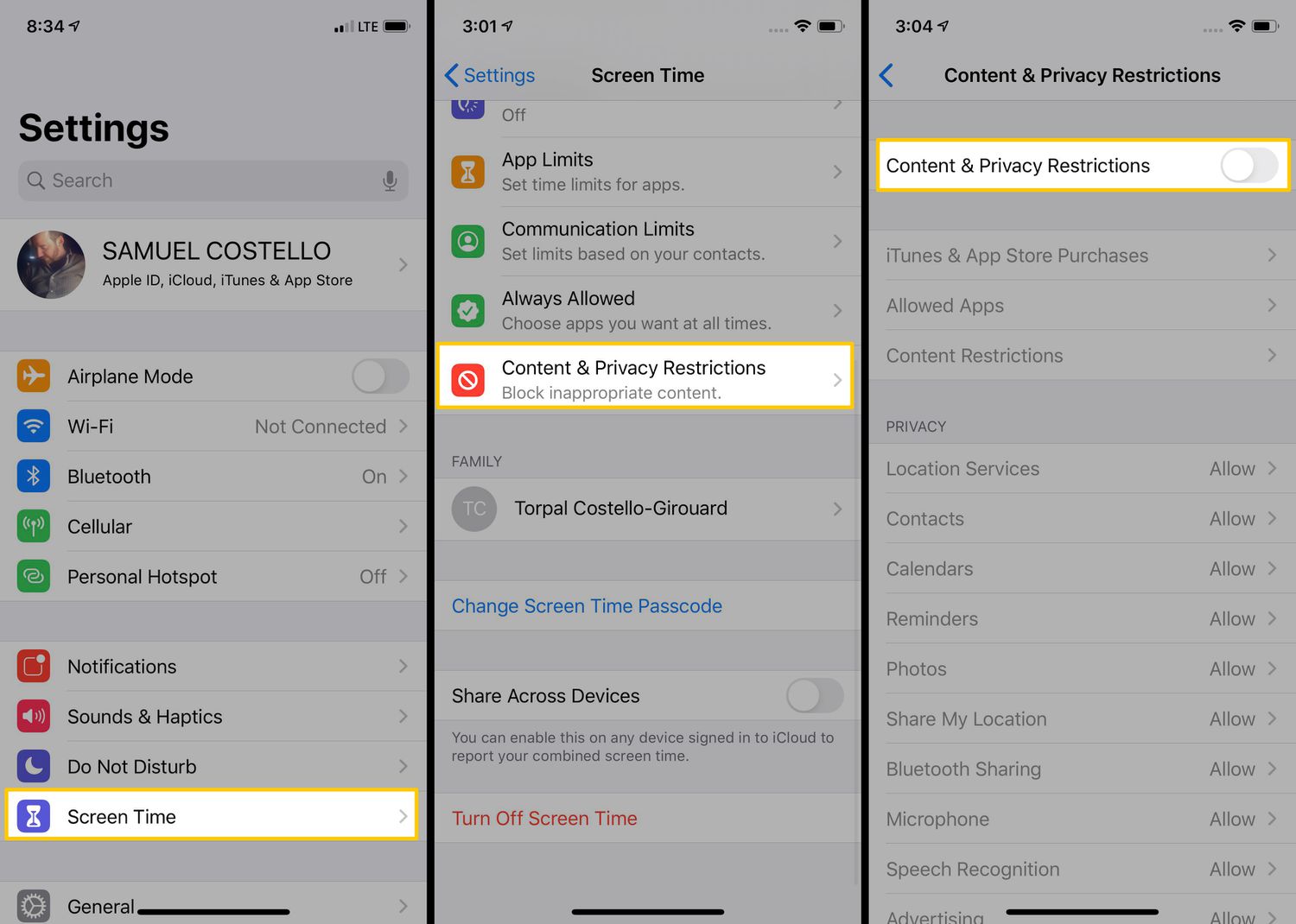
To begin, navigate to the "Settings" app on your iPhone 13 and tap on "Screen Time." If you're setting up Screen Time for a family member, select "Set Up Screen Time for Family" and follow the prompts to create a family group. This allows you to manage and customize Screen Time settings for your children's devices remotely.
Once you've accessed the Screen Time settings, you can explore various options to tailor your experience. For instance, you can set up Downtime, which schedules a specific period for your device to be in a restricted mode, allowing only essential apps and calls. This is particularly useful for promoting healthy sleep habits and reducing screen time before bedtime.
Moreover, App Limits enable you to set daily time limits for specific app categories, such as social media, games, or entertainment. By doing so, you can effectively manage and balance your app usage, fostering a healthier relationship with your device.
Another valuable feature within Screen Time is "Always Allowed," which permits access to certain apps even during Downtime. This is beneficial for ensuring access to essential apps, such as communication or productivity tools, regardless of the set restrictions.
Furthermore, Content & Privacy Restrictions provide a comprehensive suite of controls to manage access to explicit content, restrict certain websites, and prevent unauthorized purchases. This is particularly beneficial for parents who want to create a safe digital environment for their children.
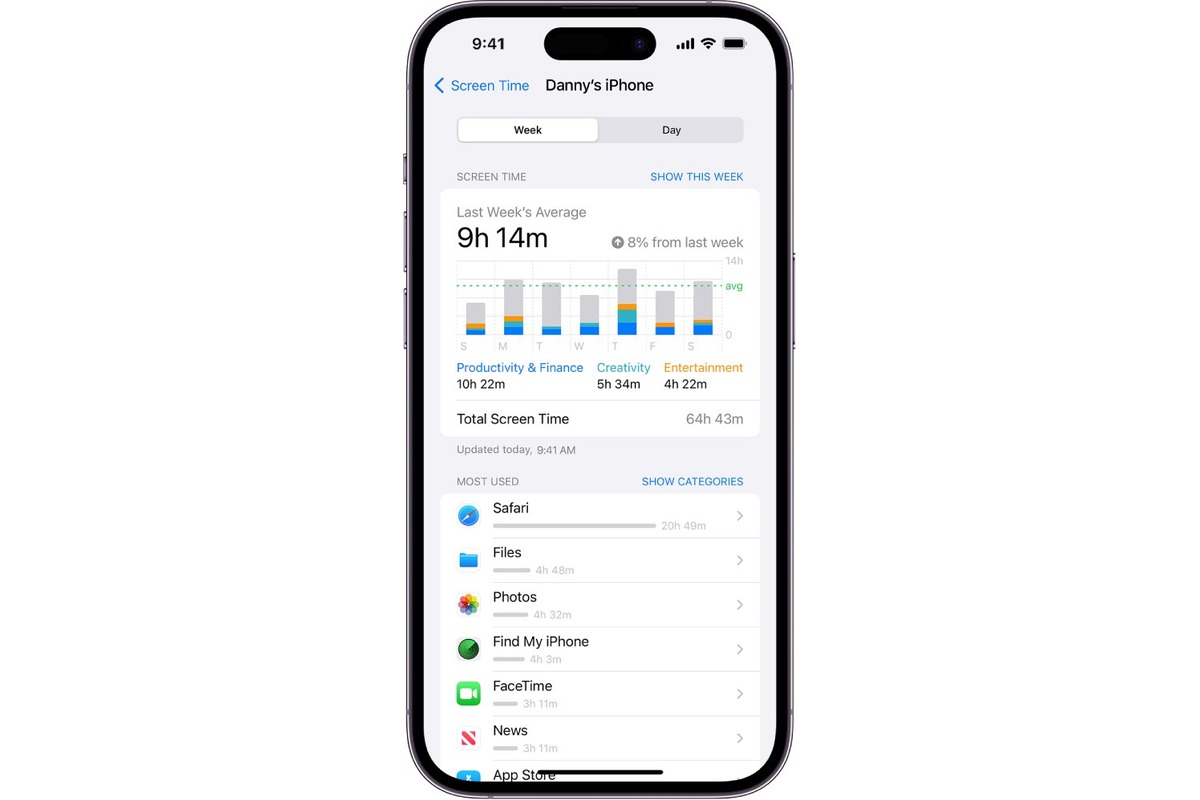
In addition, Screen Time offers insightful activity reports, detailing your device usage patterns, app usage, and notifications. This allows you to gain a deeper understanding of your digital habits and make informed decisions about managing your screen time effectively.
By setting up Screen Time on your iPhone 13, you can take control of your digital well-being and promote a healthier relationship with technology. Whether it's for personal use or managing your family's device usage, Screen Time equips you with the tools to strike a balance between staying connected and disconnecting when necessary.
Managing App Limits and Downtime
Managing app limits and downtime is a crucial aspect of maintaining a healthy digital lifestyle, and the iPhone 13's Screen Time feature provides a robust set of tools to achieve this. By effectively managing app usage and scheduling downtime, users can strike a balance between staying connected and disconnecting when necessary.
App Limits allow users to set specific time constraints on app categories, ensuring that excessive time isn't spent on non-essential applications. This feature is particularly beneficial for individuals who want to allocate their screen time more mindfully, promoting productivity and reducing distractions. For example, users can set a daily limit for social media apps, gaming, or entertainment, encouraging a healthier relationship with digital content.
Downtime, another key component of Screen Time, enables users to schedule periods during which only essential apps and calls are accessible. This feature is especially valuable for promoting healthy sleep habits and reducing screen time before bedtime. By customizing the Downtime schedule, users can create a conducive environment for relaxation and quality sleep, free from unnecessary digital distractions.
Moreover, the flexibility of App Limits and Downtime empowers users to tailor their digital experience according to their unique preferences and lifestyle. Whether it's establishing boundaries for personal screen time or managing device usage for family members, the granular controls provided by Screen Time offer a versatile solution for diverse needs.
By effectively managing app limits and scheduling downtime, users can cultivate a healthier relationship with their devices, fostering a balanced approach to digital engagement. This not only promotes mindfulness and productivity but also contributes to overall well-being by encouraging periods of disconnection and relaxation.
In essence, the ability to manage app limits and downtime through the iPhone 13's Screen Time feature empowers users to take control of their digital habits, promoting a healthier and more mindful approach to device usage.
Blocking Inappropriate Content with Content & Privacy Restrictions
Content & Privacy Restrictions on the iPhone 13 provide a robust set of tools to safeguard users, especially children, from accessing inappropriate content. By leveraging these features, users can create a safe digital environment tailored to their specific needs and preferences.
To initiate Content & Privacy Restrictions, users can navigate to the "Settings" app on their iPhone 13, select "Screen Time," and then tap on "Content & Privacy Restrictions." Upon entering a passcode, users gain access to a comprehensive suite of controls that enable them to manage various aspects of content and privacy settings.
One of the key functionalities within Content & Privacy Restrictions is the ability to restrict explicit content. Users can customize settings to prevent access to explicit websites, limit adult content, and restrict explicit language. This is particularly valuable for parents who want to ensure that their children are shielded from inappropriate material while using their devices.
Furthermore, users can manage access to specific websites by adding them to the "Never Allow" list, effectively preventing users from visiting those sites. This feature empowers parents to curate a safe browsing experience for their children, ensuring that they are not exposed to potentially harmful or unsuitable content.
In addition to content restrictions, users can control privacy settings related to location services, contacts, photos, and more. This allows individuals to manage their privacy preferences and ensure that sensitive information is protected from unauthorized access.
Moreover, Content & Privacy Restrictions offer the ability to prevent unauthorized purchases by disabling in-app purchases and managing app installations. This feature is particularly beneficial for parents who want to control their children's spending and ensure that only age-appropriate content is accessible.
By leveraging Content & Privacy Restrictions on the iPhone 13, users can establish a secure and controlled digital environment, fostering peace of mind and promoting responsible device usage. Whether it's safeguarding children from inappropriate content or managing privacy settings for personal use, these features offer a versatile and effective solution for maintaining a safe and secure digital experience.
In essence, Content & Privacy Restrictions empower users to take proactive measures in creating a safe digital environment, ensuring that content and privacy settings align with their individual preferences and requirements.
Restricting Specific Apps and Features
The iPhone 13's Screen Time feature offers a comprehensive suite of tools to restrict specific apps and features, providing users with granular control over their digital experience. By leveraging these capabilities, individuals can tailor their device usage to align with their priorities and preferences.
To initiate the process of restricting specific apps and features, users can navigate to the "Settings" app on their iPhone 13 and select "Screen Time." Within the Screen Time settings, users can tap on "App Limits" to set specific time constraints for app categories, such as social media, games, or entertainment. This empowers users to allocate their screen time more mindfully, promoting a healthier relationship with digital content.
Moreover, the "Always Allowed" feature within Screen Time allows users to designate certain apps that remain accessible even during scheduled Downtime. This ensures that essential apps, such as communication or productivity tools, are available when needed, despite the set restrictions. By customizing the "Always Allowed" list, users can strike a balance between limiting non-essential app usage while ensuring access to critical functionalities.
In addition to managing app categories, users can also restrict specific app usage by setting individual app limits. This feature enables users to allocate a specific amount of time for particular apps, effectively managing their screen time and promoting a balanced digital lifestyle. For example, users can set daily time limits for social media apps, gaming, or entertainment, encouraging mindful usage and reducing excessive screen time.
Furthermore, the iPhone 13's Screen Time feature allows users to restrict specific features, such as in-app purchases, explicit content, and privacy settings. By customizing these restrictions, individuals can create a secure and controlled digital environment tailored to their unique needs. This is particularly beneficial for parents who want to ensure that their children are shielded from inappropriate content and prevent unauthorized purchases.
By leveraging the capabilities of Screen Time to restrict specific apps and features, users can take proactive measures to manage their digital habits effectively. Whether it's promoting mindful app usage, safeguarding children from unsuitable content, or controlling privacy settings, the iPhone 13's Screen Time feature empowers users to tailor their digital experience according to their individual preferences and requirements.
Using Communication Limits for Contacts
The iPhone 13's Screen Time feature extends its functionality to include communication limits for contacts, offering users a powerful tool to manage and regulate interactions. This feature is particularly valuable for parents who seek to supervise and control their children's communication activities, ensuring a safe and secure digital environment.
By accessing the Screen Time settings on the iPhone 13, users can navigate to the "Communication Limits" section to establish restrictions on who can communicate with their device. This includes managing who can initiate communication via phone calls, messages, and FaceTime, providing a comprehensive solution for overseeing contact interactions.
When setting up communication limits, users can designate specific contacts as "Always Allowed" or "Contacts Only." The "Always Allowed" category permits unrestricted communication with designated contacts, ensuring that essential connections remain accessible at all times. On the other hand, the "Contacts Only" setting restricts communication to only those contacts listed in the user's address book, effectively controlling the scope of permissible interactions.
For parents, the ability to manage communication limits for their children's devices offers peace of mind and a proactive approach to ensuring their safety. By configuring communication restrictions, parents can prevent their children from engaging with unknown or unauthorized contacts, mitigating potential risks associated with unsupervised communication.
Moreover, the communication limits feature empowers users to tailor their device usage according to their unique preferences and requirements. Whether it's establishing boundaries for personal communication or managing contact interactions for family members, the granular controls provided by Screen Time offer a versatile solution for diverse needs.
In essence, the iPhone 13's communication limits for contacts provide a robust mechanism for users to regulate their communication channels effectively. By leveraging this feature, individuals can foster a secure and controlled digital environment, promoting responsible communication practices and safeguarding against potential risks associated with unsupervised interactions.