Choosing the Right Aftershokz Headset for You
When it comes to selecting the perfect Aftershokz headset, several factors should guide your decision. Aftershokz offers a range of headsets designed to cater to diverse preferences, lifestyles, and needs. Understanding the key features and differences between these models can help you make an informed choice that aligns with your unique requirements.
Aeropex
The Aeropex model is renowned for its lightweight design and exceptional sound quality. Crafted with premium materials, the Aeropex offers a comfortable fit, making it an ideal choice for fitness enthusiasts and individuals seeking a sleek and durable headset.
Air
Aftershokz Air is celebrated for its open-ear design, delivering a heightened awareness of the surrounding environment. This feature makes it an excellent option for outdoor activities, ensuring that users remain attuned to their surroundings while enjoying their favorite tunes or taking calls.
OpenComm
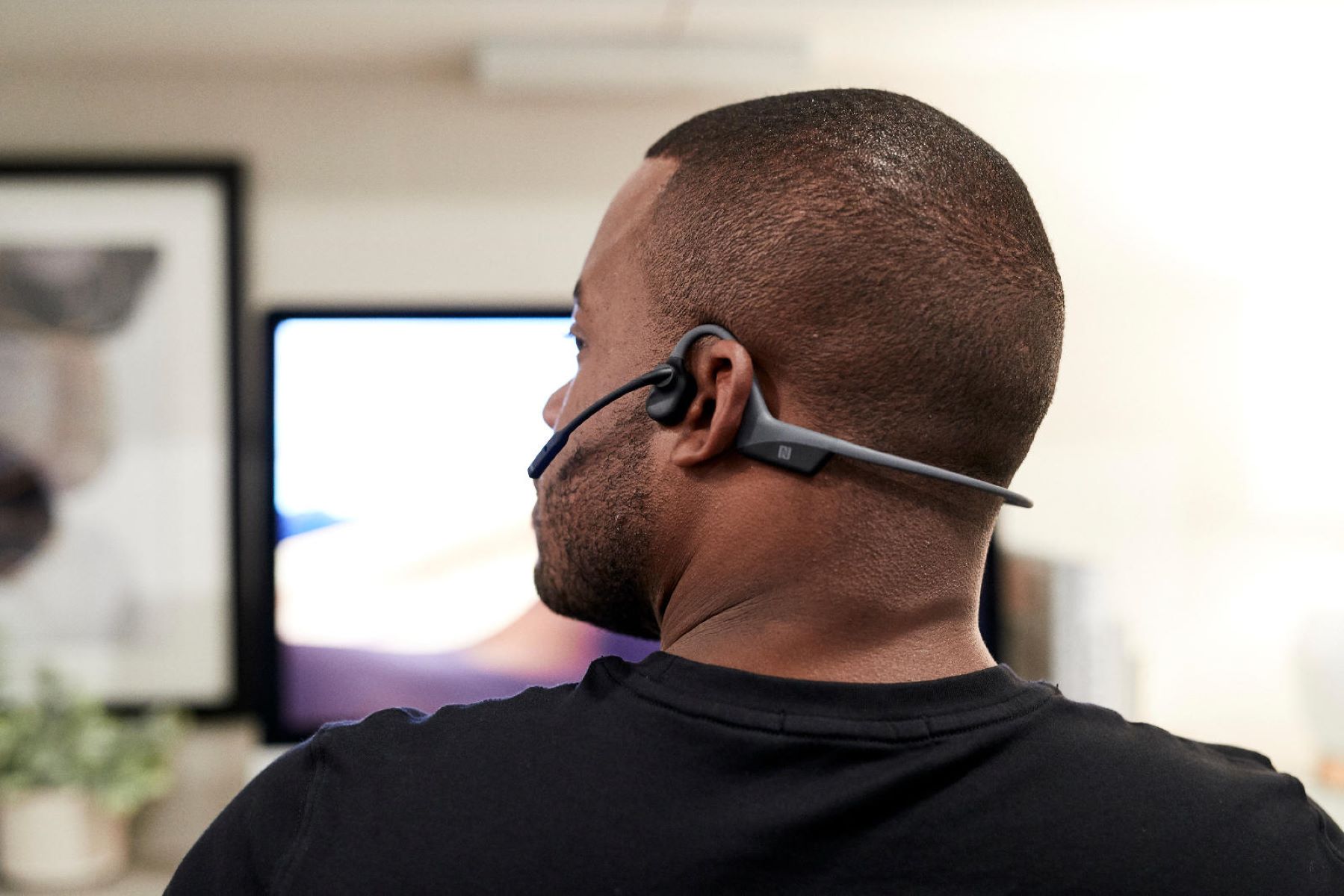
The OpenComm headset is tailored for professionals and individuals who require a versatile communication solution. With its noise-canceling boom microphone and advanced features, the OpenComm is well-suited for work-related calls, virtual meetings, and clear, uninterrupted communication.
Titanium
Aftershokz Titanium is revered for its versatility, combining a secure fit with premium sound quality. This model is suitable for various activities, from workouts to everyday listening, making it a versatile and reliable choice for individuals with diverse lifestyle demands.
Xtrainerz
The Xtrainerz headset is designed for aquatic adventures, featuring a waterproof and dustproof design that enables users to enjoy music while swimming, engaging in water sports, or simply relaxing by the pool.
When considering the right Aftershokz headset for your needs, it's essential to evaluate factors such as intended usage, environmental considerations, and specific requirements, such as sound quality, durability, and communication features. By carefully assessing these aspects, you can confidently select an Aftershokz headset that seamlessly integrates with your lifestyle and enhances your auditory experience.
Pairing Your Aftershokz Headset with Your Device
Pairing your Aftershokz headset with your device is a straightforward process that allows you to seamlessly enjoy your favorite audio content. Whether you own the Aeropex, Air, OpenComm, Titanium, or Xtrainerz model, the pairing process follows a similar set of steps, ensuring a hassle-free connection with your preferred devices.
Bluetooth Pairing
To initiate the pairing process, ensure that your Aftershokz headset is powered on and in pairing mode. Access the Bluetooth settings on your device and select the Aftershokz headset from the list of available devices. Once the pairing is successful, you will receive a confirmation message, indicating that your headset is now connected to your device.
Multipoint Pairing
If you frequently switch between multiple devices, Aftershokz headsets equipped with multipoint pairing capabilities enable you to connect and seamlessly transition between two devices simultaneously. This feature is particularly convenient for individuals who utilize both a smartphone and a computer, allowing for uninterrupted connectivity across various platforms.
NFC Pairing
For added convenience, certain Aftershokz models support Near Field Communication (NFC) pairing, enabling a swift and effortless connection with NFC-compatible devices. By simply tapping your headset against the NFC-enabled device, you can establish a quick and secure pairing, streamlining the setup process and enhancing user convenience.
Customized Pairing Instructions
Each Aftershokz headset is accompanied by detailed pairing instructions tailored to its specific features and functionalities. These instructions provide comprehensive guidance on pairing your headset with various devices, ensuring a seamless and optimized connection experience.
By following these pairing guidelines and leveraging the advanced connectivity features offered by Aftershokz headsets, you can effortlessly establish a stable and reliable connection with your preferred devices, unlocking a world of immersive audio experiences.
Troubleshooting Common Pairing Issues
While pairing your Aftershokz headset with your device is typically a seamless process, occasional challenges may arise. Understanding and addressing common pairing issues can help you swiftly resolve connectivity issues and optimize your audio experience.
Ensure Proper Device Compatibility
Before initiating the pairing process, verify that your device is compatible with the Aftershokz headset model you own. Some older devices may have limited Bluetooth compatibility, potentially leading to pairing difficulties. Updating your device’s operating system and checking for compatibility requirements can mitigate this issue.
Clear Prior Pairing Records
If you encounter difficulty pairing your Aftershokz headset with a new device, ensure that the headset is not concurrently connected to other devices. Clearing previous pairing records or disconnecting from previously paired devices can facilitate a smoother and more efficient pairing process with your current device.
Reset the Aftershokz Headset
In the event of persistent pairing challenges, performing a factory reset on your Aftershokz headset can resolve underlying connectivity issues. This process typically involves holding specific buttons or following designated steps to restore the headset to its default settings, effectively eliminating potential barriers to successful pairing.
Update Firmware and Software
Regularly updating the firmware of your Aftershokz headset and the operating system of your paired devices can address compatibility issues and enhance overall connectivity performance. Firmware updates often include optimizations and bug fixes that improve the headset’s pairing capabilities and stability.
Consult Technical Support
If persistent pairing issues persist despite troubleshooting efforts, reaching out to Aftershokz technical support can provide valuable assistance. The dedicated support team can offer personalized guidance, troubleshoot specific issues, and recommend tailored solutions to address complex pairing challenges.
By proactively addressing common pairing issues and leveraging troubleshooting strategies, you can optimize the connectivity of your Aftershokz headset, ensuring a seamless and uninterrupted audio experience across your devices.
Tips for Maintaining a Stable Connection
Ensuring a stable and reliable connection between your Aftershokz headset and your devices is essential for an uninterrupted and immersive audio experience. By implementing the following tips, you can optimize the connectivity of your headset and maintain a consistent and stable connection.
Keep Devices Within Proximity
When using your Aftershokz headset, strive to keep your paired devices within close proximity to minimize potential signal interference and maintain a strong Bluetooth connection. Maintaining an optimal distance between your headset and your device can enhance signal stability and reduce the likelihood of connectivity disruptions.
Minimize Signal Obstructions
Avoid placing physical obstructions, such as walls or large objects, between your Aftershokz headset and your paired device. Signal obstructions can impede the transmission of Bluetooth signals, leading to connectivity issues. By minimizing obstructions, you can promote a clear and unhindered signal path, fostering a stable connection.
Regularly Charge Your Devices
Ensure that both your Aftershokz headset and paired devices are adequately charged to maintain optimal connectivity. Low battery levels can compromise the stability of the Bluetooth connection, potentially leading to intermittent disconnections. By keeping your devices sufficiently charged, you can sustain a stable and reliable connection during extended usage.
Update Firmware and Software
Regularly checking for and installing firmware updates for your Aftershokz headset, as well as software updates for your paired devices, is crucial for optimizing connectivity. These updates often include enhancements to Bluetooth functionality, addressing potential connectivity issues and improving overall stability.
Utilize Multipoint Pairing Strategically
If your Aftershokz headset supports multipoint pairing, strategically manage and prioritize connected devices to minimize potential conflicts and maintain a stable connection. Prioritizing the primary device and judiciously managing secondary connections can contribute to a seamless and stable multi-device experience.
By implementing these proactive measures and best practices, you can foster a stable and consistent connection between your Aftershokz headset and your paired devices, ensuring an uninterrupted and enjoyable audio experience across various activities and environments.
Using Multiple Devices with Your Aftershokz Headset
Many Aftershokz headsets offer the convenience of multipoint pairing, allowing users to connect and seamlessly switch between multiple devices without the need for repetitive pairing processes. This versatile feature enhances flexibility and enables users to enjoy their headset across various devices, optimizing their audio experiences in diverse settings.
Seamless Transition Between Devices
With multipoint pairing, users can effortlessly transition between paired devices, such as smartphones, tablets, laptops, and more, without the hassle of repeatedly pairing and unpairing their Aftershokz headset. This streamlined connectivity simplifies the user experience, particularly for individuals who frequently switch between devices throughout their day.
Optimizing Work and Leisure Activities
For professionals and multitaskers, the ability to seamlessly switch between a work laptop and a personal smartphone while using the same Aftershokz headset enhances productivity and convenience. Whether engaging in virtual meetings, listening to music, or taking calls, multipoint pairing accommodates diverse activities without interrupting the audio flow.
Enhanced Connectivity for Active Lifestyles
Individuals with active lifestyles can benefit from multipoint pairing when transitioning between fitness trackers, smartphones, and other devices during workouts or outdoor activities. This feature allows for uninterrupted access to audio content, ensuring that users remain motivated and engaged while pursuing their fitness goals.
Managing Prioritized Devices
When using multiple devices with your Aftershokz headset, it’s essential to manage and prioritize connected devices based on your current usage needs. Prioritizing the primary device for audio playback and strategically managing secondary connections can optimize the multipoint pairing experience and minimize potential conflicts.
Customizing Multipoint Pairing Settings
Depending on the Aftershokz headset model, users may have the option to customize multipoint pairing settings, such as defining preferred devices or adjusting connection priorities. These customizable features offer greater control over the multipoint pairing experience, allowing users to tailor connectivity to their specific preferences.
By leveraging the multipoint pairing capabilities of Aftershokz headsets, users can seamlessly integrate their audio experiences across multiple devices, whether for work, leisure, fitness, or everyday activities, enhancing convenience and flexibility in their audio consumption.