Choosing the Right Packaging Materials
When it comes to transporting a monitor, one of the most important factors to consider is choosing the right packaging materials. Proper packaging not only ensures the safety of your monitor during transit but also minimizes the risk of any potential damage. Here are some essential packaging materials to consider:
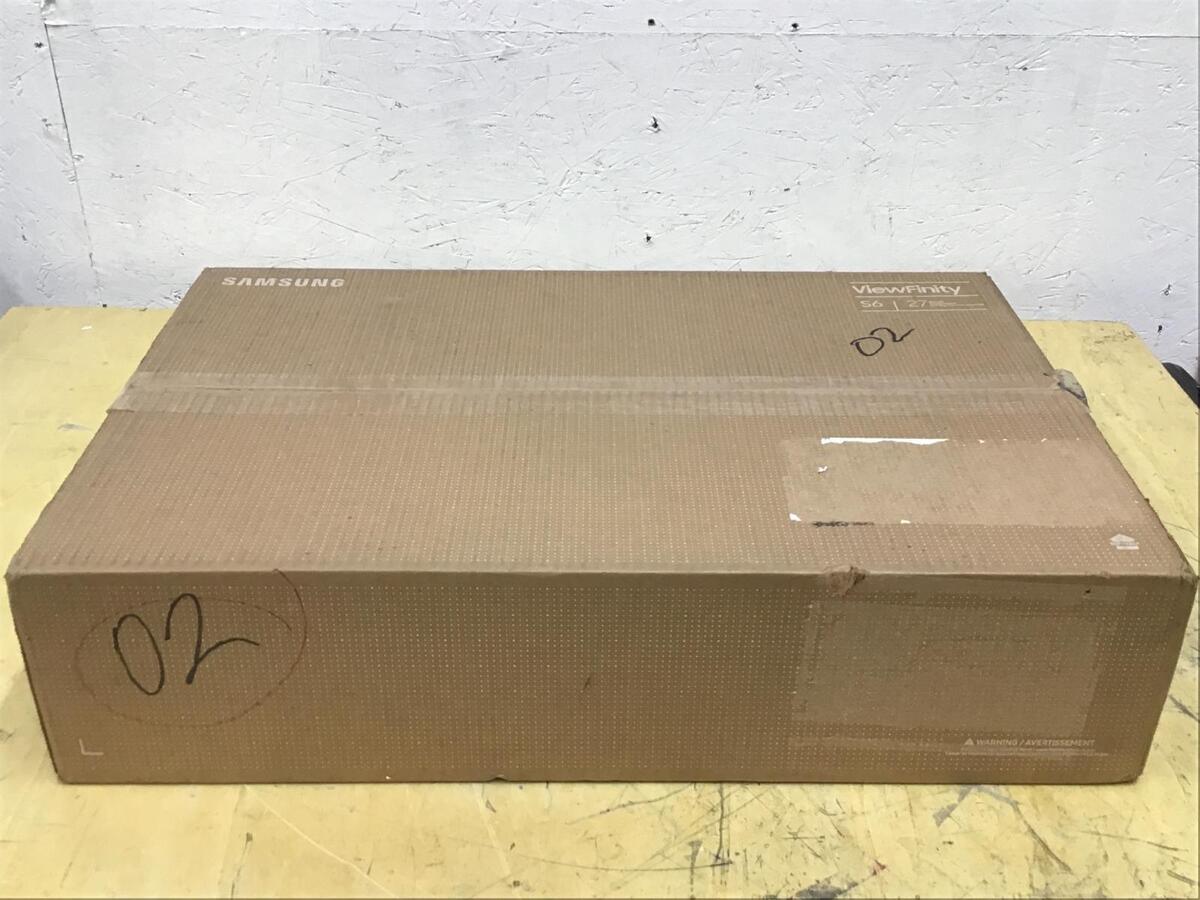
- Monitor Box: If you still have the original packaging box that came with your monitor, it is ideal for transportation. These boxes are specifically designed to provide a secure fit for the monitor and typically come with foam inserts for added protection.
- Cardboard Box: If you don’t have the original box, you can use a sturdy cardboard box that is large enough to accommodate the monitor. Look for a box that can provide a snug fit but also leave enough space for additional packing material.
- Bubble Wrap: Bubble wrap is an excellent material for protecting your monitor from impact and scratches. Wrap the monitor with several layers of bubble wrap, paying special attention to the corners and edges.
- Styrofoam or Foam Inserts: To provide added cushioning, consider using styrofoam or foam inserts. Cut these materials to fit the sides of the box and place them around the monitor to minimize movement during transit.
- Packing Peanuts or Air Cushions: Fill any empty spaces in the box with packing peanuts or air cushions to prevent the monitor from shifting around. This will absorb shock and minimize the risk of damage.
- Tape and Sealing Materials: Use high-quality packing tape to seal the box securely. Reinforce the edges and seams of the box to ensure it does not come apart during transportation.
- Markers or Labels: Clearly label the box as “Fragile” to alert handlers to handle the package with extra care. You can also include arrows indicating the correct orientation of the box.
By choosing the right packaging materials, you can ensure that your monitor is well-protected during transportation. Remember, it’s better to be safe than sorry, so invest the time and effort in securing your monitor properly to avoid any unfortunate accidents.
Removing Cables and Accessories
Before packing your monitor for transportation, it is crucial to remove all cables and accessories attached to it. This step will not only protect the monitor but also prevent any potential damage to the cables and accessories themselves. Here are some important considerations when removing cables and accessories:
- Power Cable: Unplug the power cable from the monitor and wall outlet. Bundle it neatly and secure it with a twist tie or a Velcro strap. This will prevent any tangles or damage to the cable during transit.
- HDMI/DVI/VGA Cables: Disconnect any video cables that are connected to your monitor. Coil them carefully and secure them with a twist tie or Velcro strap. It is a good idea to label these cables for easy identification during setup at your destination.
- USB Cables: If you have any USB peripherals connected to your monitor, disconnect them and pack them separately. Coil the USB cables and secure them to avoid any tangles or damage.
- Accessories: Remove any additional accessories such as the monitor stand or wall-mount bracket. Keep these accessories in a separate bag or box, ensuring that they are adequately protected to avoid any scratches or damage.
- Documentation and Wires: If you have any user manuals, warranty cards, or other documentation related to your monitor, store them in a safe place. Pack any loose wires or adapters securely to avoid misplacing or damaging them.
By taking the time to remove cables and accessories properly, you will ensure that all components of your monitor are safely transported. Remember to keep cables organized and labeled for easy setup once you arrive at your destination.
Securing the Monitor in the Original Box
If you still have the original packaging box for your monitor, it is highly recommended to use it for transportation. The original box is designed specifically to provide a snug fit for the monitor and offers extra protection with the foam inserts. Here’s how you can secure your monitor in the original box:
- Prepare the Box: Open the box and ensure that it is clean and free of any debris. Check if there are any pre-cut foam inserts or protective materials inside the box.
- Wrap the Monitor: Wrap your monitor with a layer of bubble wrap before placing it in the box. This will provide an additional layer of cushioning and protect it from scratches or impact during transit.
- Place the Monitor: Gently place the wrapped monitor into the box, ensuring that it sits snugly. If there are pre-cut foam inserts, position the monitor in the designated area to prevent it from moving during transportation.
- Add Extra Padding: If there are any empty spaces between the monitor and the box, fill them in with additional packing material like packing peanuts or air cushions. This will prevent the monitor from shifting or bouncing inside the box.
- Seal the Box: Once the monitor is securely placed and surrounded by enough padding, close the box and seal it with sturdy packing tape. Reinforce the edges and seams to ensure that the box remains intact during transit.
The original box provides the best level of protection for your monitor during transportation. The foam inserts in the box are specifically designed to absorb shock and prevent any damage. By following these steps, you can ensure that your monitor is securely packed and ready for a safe journey.
Providing Extra Padding for Protection
When transporting a monitor, it is crucial to provide extra padding to ensure its protection throughout the journey. Even if you are using the original packaging box or a sturdy cardboard box, adding additional padding will help absorb shock and minimize the risk of damage. Here are some ways to provide extra padding for your monitor:
- Bubble Wrap: Wrap the monitor with several layers of bubble wrap. This will create a protective barrier and cushion it against any impact during transit. Pay special attention to the corners and edges, as they are the most vulnerable areas.
- Styrofoam or Foam Inserts: If you have access to styrofoam or foam inserts, cut them into pieces to fit the sides of the box. Place these inserts around the monitor to provide additional cushioning and minimize movement during transportation.
- Packing Peanuts or Air Cushions: Fill any empty spaces in the box with packing peanuts or air cushions. These materials will help absorb shock and prevent the monitor from shifting around during transit.
- Blankets or Towels: If you don’t have access to bubble wrap or packing materials, consider using soft blankets or towels to wrap around the monitor. This will provide an extra layer of padding and protection.
- Pillow or Cushions: For added protection, place a pillow or cushions in the box on the sides of the monitor. These soft materials will absorb shock and minimize the risk of any impact during transit.
It’s important to strike the right balance between providing enough padding for protection while avoiding excessive pressure on the monitor. Ensure that the monitor is snugly packed and does not have any room to move inside the box. By taking the time to provide extra padding, you can greatly enhance the safety of your monitor during transportation.
Using a Laptop Bag or a Suitcase
Transporting a monitor doesn’t always have to involve bulky boxes or specialized packaging. If you’re looking for a more convenient and portable option, consider using a laptop bag or a suitcase to transport your monitor. Here’s how you can use these items effectively:
- Choose the Right Bag: Select a laptop bag or a suitcase that is large enough to accommodate your monitor. Make sure there is enough padding and protection inside the bag to prevent any potential damage.
- Remove Cables and Accessories: Before placing the monitor in the bag or suitcase, remember to remove all cables and accessories. Coil them neatly and pack them separately to avoid any tangling or damage.
- Wrap the Monitor: Wrap the monitor with a layer of bubble wrap or use a protective sleeve to provide an added layer of cushioning. This will protect the monitor from scratches or any minor impact during transit.
- Place the Monitor Carefully: Gently place the wrapped monitor into the laptop bag or suitcase. Ensure that it is positioned securely and does not have any room to move around inside the bag.
- Add Extra Padding: If there are any empty spaces in the bag or suitcase, fill them in with soft materials such as clothing or towels. This will provide additional padding and prevent the monitor from shifting during transportation.
- Securely Close the Bag: Once the monitor is properly placed and surrounded by enough padding, securely close the laptop bag or suitcase. Double-check the zippers, locks, or straps to ensure they are properly fastened.
- Handle with Care: When carrying the bag or suitcase, be mindful of the monitor’s fragility. Avoid dropping or banging the bag against hard surfaces, and handle it with care to prevent any potential damage.
Using a laptop bag or a suitcase for transporting your monitor offers convenience and portability. It is particularly useful when you need to transport your monitor for short distances or when you prefer a more compact solution. Just make sure to provide adequate padding and secure the bag properly to ensure the safety of your monitor throughout the journey.
Wrapping the Monitor with Bubble Wrap
When it comes to packing fragile items like monitors, bubble wrap is a highly effective material for providing cushioning and protection. Wrapping your monitor with bubble wrap ensures that it is safeguarded against impact and minimizes the risk of scratches during transit. Here’s how you can wrap your monitor with bubble wrap:
- Prepare the Bubble Wrap: Start by laying out a piece of bubble wrap on a flat surface. Ensure that the bubble side is facing up, ready to be wrapped around the monitor.
- Measure and Cut: Estimate the amount of bubble wrap you’ll need to cover the entire monitor. Cut a piece that is slightly larger than the dimensions of the monitor, allowing for enough wrap to fold over the edges.
- Position the Monitor: Gently place the monitor in the center of the bubble wrap. Ensure that the screen is facing up and align the edges of the monitor with the edges of the bubble wrap.
- Wrap the Bubble Wrap: Starting from one side, bring the edge of the bubble wrap over the monitor, tucking it underneath to secure it. Continue wrapping the bubble wrap around the monitor, overlapping the edges as you go.
- Secure with Tape: Once the monitor is fully wrapped, secure the bubble wrap in place with some packing tape. This will prevent it from unraveling during transportation.
- Pay Attention to Corners and Edges: Make sure to pay extra attention to the corners and edges of the monitor. These areas are more susceptible to impact, so ensure they are properly wrapped and cushioned.
- Label the Wrapped Monitor: It can be helpful to label the bubble-wrapped monitor with a “Fragile” sticker or a clear marking to alert handlers to handle with care.
Wrapping your monitor with bubble wrap provides an additional layer of protection. The bubbles act as shock absorbers and minimize the risk of damage during transportation. Remember to handle the wrapped monitor with care and avoid placing any heavy objects on top of it to maintain its integrity.
Utilizing Styrofoam or Foam Inserts
When packing your monitor for transportation, using styrofoam or foam inserts can provide an extra layer of protection. These materials are designed to absorb shock and minimize movement, ensuring that your monitor arrives safely at its destination. Here’s how you can utilize styrofoam or foam inserts:
- Measure and Cut: If you have styrofoam or foam sheets, measure the dimensions of your monitor and cut the material accordingly. Make sure to cut pieces that will fit snugly on the sides and corners of the box.
- Place the Monitor: Position the monitor in the box or packaging material, ensuring that it is centered.
- Insert the Styrofoam or Foam: Gently insert the cut styrofoam or foam pieces around the sides and corners of the monitor. The goal is to create a snug fit and prevent any movement during transit.
- Secure the Inserts: If necessary, use tape or adhesive to secure the styrofoam or foam inserts in place. This will prevent them from shifting or coming loose.
- Fill Empty Spaces: Check for any empty spaces between the monitor and the box. If there are any gaps, fill them in with additional styrofoam or foam pieces to provide more support and cushioning.
- Double-check Stability: Once the styrofoam or foam inserts are in place, gently shake the box to ensure that the monitor is securely held. If there is any movement, add more inserts or padding to stabilize it further.
Utilizing styrofoam or foam inserts adds an extra layer of protection to your monitor. These materials absorb shock and minimize the risk of damage caused by jolts or vibrations during transportation. Always ensure that the inserts fit properly and securely in the box, providing sufficient cushioning and stability for your monitor.
Placing the Monitor in a Cardboard Box
If you don’t have the original packaging box for your monitor, using a sturdy cardboard box is an effective alternative. However, it is important to properly place the monitor in the box to ensure its safety during transportation. Here’s how you can do it:
- Select the Right Box: Choose a cardboard box that is slightly larger than the size of your monitor. This will allow room for additional padding and protection.
- Prepare the Box: Ensure that the box is clean, sturdy, and in good condition. Remove any old labels or stickers that may interfere with the packaging process.
- Layer the Bottom: Place a layer of cushioning material at the bottom of the box. This can be anything from bubble wrap to packing peanuts or foam inserts. This will provide a soft base for the monitor.
- Position the Monitor: Carefully place the monitor in the box with the screen facing upward. Ensure that it is centered and snugly fits without excessive movement.
- Add Extra Padding: Surround the monitor with additional cushioning material. This can include bubble wrap, foam inserts, or crumpled paper. Fill any empty spaces between the monitor and the box with padding material to prevent shifting.
- Close the Box: Once the monitor is properly placed and surrounded by sufficient padding, close the box. Fold the flaps and secure them with sturdy packing tape, ensuring that they are tightly sealed.
- Seal the Edges: To reinforce the box further, apply tape along the seams and edges of the box. This will provide extra stability and prevent the box from accidentally opening during transit.
- Label the Box: Clearly label the box with “Fragile” to indicate that it contains delicate items. You can also mark the box with arrows to indicate the correct upright position.
Placing your monitor in a cardboard box requires attention to detail to ensure its safety. By following these steps and providing adequate padding, you can transport your monitor securely, even without the original packaging box.
Taping and Sealing the Box Securely
Once you have packed your monitor and ensured it is properly protected, the next crucial step is to securely tape and seal the box. This will prevent the box from opening during transportation and provide an additional layer of protection. Here’s how you can tape and seal the box securely:
- Use High-Quality Packing Tape: Start by using high-quality packing tape that is durable and resistant to tearing. Avoid using low-quality tape that may easily break or come loose.
- Reinforce the Seams: Begin by folding the flaps of the box and aligning them properly. Apply several strips of tape along the seams of the box to reinforce its strength and prevent the flaps from popping open.
- Tape the Edges: After reinforcing the seams, tape along the edges of the box to provide additional security. This will further strengthen the structure and minimize the risk of accidental opening.
- Tape the Corners: Pay special attention to the corners of the box, as they are more susceptible to damage. Apply extra layers of tape at the corners to provide added protection and prevent them from coming apart.
- Apply Cross Tape: To enhance the box’s stability, apply tape in a crisscross pattern across the top of the box. This will add extra strength and keep the flaps securely closed.
- Inspect the Box: Once you have taped and sealed the box, take a few moments to inspect it. Check for any loose or weak areas and reinforce them with additional tape if needed.
Taping and sealing the box securely is crucial to protect your monitor during transportation. By using high-quality tape and reinforcing the seams, edges, and corners, you can ensure that the box remains tightly sealed throughout its journey.
Labeling and Marking “Fragile” on the Box
Properly labeling and marking your box as “Fragile” is essential to ensure that the handlers treat your monitor with the necessary care during transport. By providing clear instructions and warnings, you can reduce the risk of mishandling and increase the chances of your monitor arriving in good condition. Here’s how you can label and mark the box:
- Use Legible and Clear Labels: Write or print the word “Fragile” on a label with legible and clear letters. Make sure the label is large enough to be easily seen by handlers.
- Place Labels on Multiple Sides: Attach the “Fragile” labels to multiple sides of the box. This ensures that the labels are visible from various angles and help draw attention to the fragile nature of the contents.
- Use Sturdy and Easily Recognizable Labels: Opt for labels that are sturdy and water-resistant, as this will prevent them from getting damaged during transit. Additionally, labels with bright colors or bold designs can attract more attention.
- Include Arrows for Orientation: To guide handlers on the correct orientation of the box, consider adding arrows to the labels. These arrows can indicate the upright position to prevent any mishandling.
- Indicate Special Handling Instructions: If there are any particular instructions or requirements for handling your monitor, include them on the labels. For example, you can specify to keep the box upright or to avoid stacking heavy items on top of it.
- Secure the Labels: Ensure that the labels are securely attached to the box. Use clear packing tape to cover and protect the labels, preventing them from peeling off or getting damaged during transit.
- Double-Check the Labels: Before sending off the box, take a moment to double-check the labels. Make sure they are visible, easily readable, and properly attached.
By labeling and marking the box as “Fragile” and including clear instructions, you can alert handlers to exercise caution and handle the package with care. This simple step greatly enhances the likelihood of your monitor arriving safely at its destination.